Binance P2P Trading Guide: Buy Crypto with Local Currency
How to buy and sell cryptocurrency using Binance P2P. Step-by-step guide for safe peer-to-peer trading.
What Is Binance P2P?
P2P (peer-to-peer) trading lets you buy and sell crypto directly with other users using local payment methods — bank transfer, mobile payment, cash, etc.
How P2P Works
- Buyer places an order for USDT/BTC/etc
- Seller receives notification
- Buyer sends payment via local method
- Seller confirms receipt
- Binance releases crypto from escrow to buyer
Binance holds the crypto in escrow during the trade, protecting both parties.
Step-by-Step: Buying on P2P
Step 1: Go to P2P
Navigate to Trade → P2P
Step 2: Select Your Options
- Choose Buy
- Select crypto (USDT recommended)
- Select your local currency
- Choose payment method
Step 3: Pick a Seller
- Look for sellers with high completion rates (>95%)
- Check for the Verified Merchant badge
- Compare prices across sellers
Step 4: Place Order
Enter the amount you want to buy and confirm.
Step 5: Make Payment
Transfer funds using the seller’s specified payment method. Follow their exact instructions.
Step 6: Confirm Payment
Click “I’ve Paid” after sending the money. Wait for the seller to verify and release crypto.
P2P Safety Tips
- Only trade with verified merchants
- Never release payment outside the platform
- Don’t share personal info beyond what’s needed
- Keep proof of payment (screenshot)
- Complete within the time limit or the order cancels
- Never accept overpayment — it’s a common scam
P2P Fees
Binance charges zero fees on P2P trading. The prices you see already include the seller’s markup.
When to Use P2P
- Your country doesn’t support direct bank deposits on Binance
- You want to buy with local currency
- Bank transfers to exchanges are blocked
- You prefer paying with mobile money or cash
Get 20% Off Binance Trading Fees with RATE20
New to Binance? Open the official signup page with RATE20 already applied for a 20% trading-fee discount. You do not need to copy or type the code. Review the referral details before completing registration.
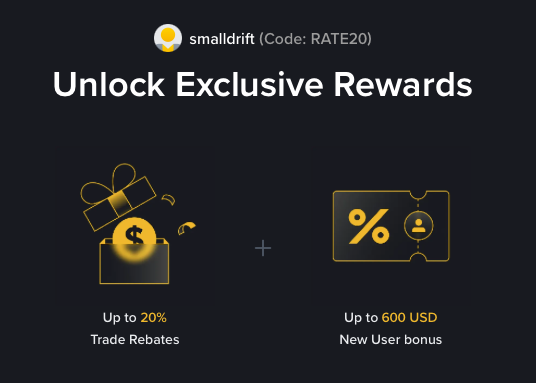
- Referral code: RATE20, pre-applied by this link
- Fee discount: 20%, shown on the Binance signup screen
- Additional rewards: Check Binance for current promotions and regional availability
Be wary of unofficial referral offers promising benefits they cannot show. The Binance signup screen lets you check the code and fee discount directly.
Compare Binance fees and available discounts →
SmallDrift may earn a commission when you sign up through this link. Trading involves risk, including loss of capital.
Related Articles
Explore Related Guides
Daily Crypto Market News
Follow Bitcoin price moves, major altcoins, and the events shaping the market.
Bitcoin ETF Flows Guide
Understand ETF inflows and outflows, and how to read them alongside price action.
Binance Fee Calculator
Learn how to estimate trading costs with referral and BNB discounts.
Verified Binance Referral Guide
See how RATE20 is applied and what to check on the Binance signup screen.