Is Binance Safe? Security Features Every User Should Enable
Comprehensive review of Binance's security measures, the SAFU fund, and a step-by-step guide to securing your account with 2FA, whitelists, and anti-phishing codes.
The Short Answer: Yes, But Your Settings Matter
Binance is the world’s largest cryptocurrency exchange, securing billions of dollars in assets for over 150 million users. It has institutional-grade security infrastructure, a $1B+ insurance fund, and has never lost user funds permanently.
But here’s the thing — even the most secure exchange can’t protect you if you leave your front door open. Most crypto theft happens because of poor account security on the user’s end, not exchange breaches.
This guide covers Binance’s security infrastructure and every setting you should configure to maximize your protection.
Binance’s Security Infrastructure
SAFU (Secure Asset Fund for Users)
Binance allocates a percentage of all trading fees to the SAFU emergency insurance fund. This fund exists to reimburse users in case of a security breach.
- Size: Over $1 billion
- Purpose: Cover losses from security incidents
- Track record: Fully covered the 2019 hack ($40 million reimbursed to all affected users)
Cold Storage
The vast majority of user assets (reportedly 95%+) are stored in offline cold wallets. Cold storage means:
- Private keys are never connected to the internet
- Multiple layers of physical security
- Multi-signature requirements for any movement of funds
Real-Time Risk Monitoring
Binance uses AI-powered systems that:
- Monitor all transactions for suspicious patterns
- Flag unusual login activity
- Detect potential phishing attempts
- Freeze accounts showing signs of compromise
Proof of Reserves
Binance publishes proof-of-reserves audits, allowing users to verify that the exchange holds sufficient assets to cover all deposits. You can check the latest audit on Binance’s transparency page.
The 2019 Hack: What Happened and What It Proved
In May 2019, hackers stole 7,000 BTC (~$40 million) from Binance using a combination of phishing, viruses, and other techniques. They compromised multiple user accounts and API keys.
Binance’s response:
- Detected the breach quickly
- Halted all withdrawals immediately
- Reimbursed ALL affected users from the SAFU fund
- Implemented additional security measures
- No user lost a single dollar
This incident actually increased trust in Binance because it demonstrated that the insurance fund works as intended. Many exchanges have been hacked — what matters is how they respond.
Essential Security Settings (Do These Now)
1. Two-Factor Authentication (2FA)
Priority: CRITICAL
Without 2FA, anyone who gets your password can access your account. Enable 2FA immediately.
Google Authenticator (Recommended):
- Download Google Authenticator on your phone
- Go to Binance → Security → Authenticator App
- Scan the QR code
- Write down the backup key on paper (not a screenshot)
- Enter the 6-digit code to confirm
Hardware Security Key (Most Secure):
- Buy a YubiKey or similar FIDO2-compatible key
- Go to Security → Security Key
- Register the key with your Binance account
- You’ll need the physical key for every login
Why NOT SMS: SMS-based 2FA is vulnerable to SIM-swap attacks, where an attacker convinces your carrier to transfer your phone number to their SIM card. They then receive your 2FA codes. Use Google Authenticator or a hardware key instead.
2. Anti-Phishing Code
Priority: HIGH
This is a custom code that appears in every legitimate Binance email. If an email claiming to be from Binance doesn’t include your code, it’s fake.
Setup:
- Go to Security → Anti-Phishing Code
- Set a unique code (something only you would recognize)
- All future Binance emails will include this code
3. Withdrawal Whitelist
Priority: HIGH
This restricts withdrawals to pre-approved addresses only. Even if someone accesses your account, they can’t withdraw to their own address.
Setup:
- Go to Security → Withdrawal Whitelist
- Enable the feature
- Add your trusted withdrawal addresses
- New addresses require a 24-hour waiting period before they’re active
4. Device Management
Priority: MEDIUM
Review and manage devices that have access to your account.
- Go to Security → Device Management
- Review the list of authorized devices
- Remove any devices you don’t recognize
- Enable “New Device Login Notification”
5. IP Whitelist (Advanced)
Priority: MEDIUM-HIGH for API users
If you use Binance API for trading bots, restrict API access to specific IP addresses. This prevents stolen API keys from being used on other machines.
Password Best Practices
The basics:
- At least 12 characters (longer is better)
- Mix of uppercase, lowercase, numbers, and symbols
- Never reuse your Binance password anywhere else
- Use a password manager (Bitwarden, 1Password, KeePass)
What NOT to do:
- Don’t use your exchange name in the password
- Don’t use personal information (birthday, name, phone)
- Don’t store it in plain text (notes app, email draft, sticky note)
- Don’t share it with anyone, ever
Recognizing Phishing Attacks
Phishing is the #1 way crypto gets stolen. Common tactics:
Fake Emails
- “Your account has been compromised — click here to secure it”
- “Verify your identity or your account will be closed”
- “You’ve received a deposit — click to confirm”
How to verify: Check for your anti-phishing code. If it’s missing, the email is fake. Also check the sender address carefully — phishing often uses domains like binance-support.com instead of binance.com.
Fake Websites
- binance-login.com, b1nance.com, binannce.com
- Google ads sometimes show phishing sites above real results
How to protect yourself:
- Bookmark the real Binance URL and always use it
- Check the SSL certificate (the padlock icon in your browser)
- Never click login links in emails or messages
Fake Customer Support
- “Binance Support” contacting you on Telegram, Discord, or Twitter
- Asking for your password, 2FA code, or seed phrase
Rule: Binance support will NEVER contact you first. They will NEVER ask for your password or 2FA codes. Anyone who does is a scammer.
Account Recovery
If you lose access to your account:
- Go to the Binance login page and click “Security Verification Unavailable”
- Follow the account recovery process
- You’ll need to verify your identity with your KYC documents
- Recovery typically takes 7-14 days
- This is why saving your 2FA backup key is critical — it avoids this entire process
Security Checklist
- Google Authenticator or hardware key enabled
- 2FA backup key saved on paper (not digitally)
- Anti-phishing code set
- Withdrawal whitelist enabled with trusted addresses
- Unknown devices removed
- Strong unique password set
- Real Binance URL bookmarked
- Email account secured (strong password + 2FA on email too)
The Bottom Line
Binance is as safe as any centralized exchange gets. The SAFU fund, cold storage, and security infrastructure are industry-leading. But no exchange can protect you from phishing, weak passwords, or disabled 2FA.
Spend 20 minutes setting up every security feature listed above. Then sign up (or upgrade your security on an existing account) with referral code XVZGVYXX for 20% off trading fees — because saving money on fees matters, but only if your money is secure first.
Verify Before You Sign Up — Don't Get Scammed
Many sites advertise fake referral discounts that don't actually apply. Before signing up through any referral link, always verify the referral code and discount rate shown on the Binance registration page. Here's proof of our verified referral:
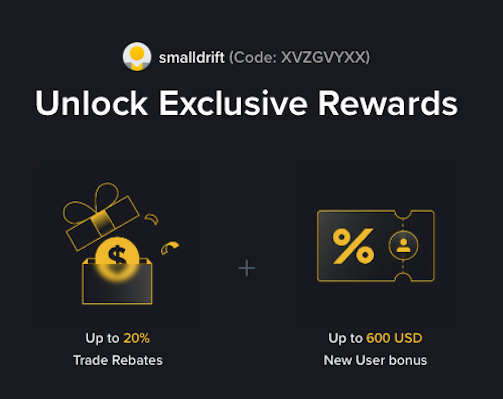
- Referral Code: XVZGVYXX
- Trade Rebate: Up to 20% on every trade (lifetime)
- New User Bonus: Up to 600 USD
If the registration page does not show these benefits, do not proceed. Only sign up when you can confirm the referral code and discount are applied.