Crypto Security 101: Protect Your Exchange Account
Essential security practices for cryptocurrency traders. Learn how to protect your Binance account from hackers and phishing attacks.

In crypto, security is everything. Unlike banks, there’s no fraud department to call if your funds are stolen. Here’s how to protect yourself.
Enable Two-Factor Authentication (2FA)
This is the single most important security step. Without 2FA, anyone with your password can access your account.
Best options (ranked by security):
- Hardware security key (YubiKey) — most secure
- Google Authenticator app — recommended
- SMS verification — least secure (vulnerable to SIM swapping)
Set up Google Authenticator at minimum. It takes 2 minutes and dramatically reduces your risk.
Set Up Anti-Phishing Code
Binance lets you set a custom anti-phishing code — a word or phrase that appears in every legitimate email from Binance. If you receive an email without your code, it’s a phishing attempt.
To set it up: Account → Security → Anti-Phishing Code
Use a Withdrawal Whitelist
Enable the withdrawal whitelist feature to only allow crypto withdrawals to pre-approved addresses. Even if someone gains access to your account, they can’t withdraw to an unknown address.
When you add a new address to the whitelist, there’s a 24-hour waiting period before it becomes active — giving you time to react if an unauthorized address was added.
Password Best Practices
- Use a unique password for your exchange account (never reuse passwords)
- Make it at least 16 characters long
- Use a password manager (Bitwarden, 1Password)
- Never share your password with anyone — exchange support will never ask for it
Recognize Phishing Attempts
Common crypto phishing tactics:
- Fake emails: “Your account has been compromised, click here to verify”
- Fake websites: Slightly misspelled domains (bìnance.com, binannce.com)
- Fake support: Scammers on social media posing as exchange support
- Fake airdrops: “Connect your wallet to claim free tokens”
Rule of thumb: If someone contacts you first about your crypto, it’s a scam.
Cold Storage for Long-Term Holdings
If you’re holding crypto long-term (not actively trading), consider moving it to a hardware wallet:
- Ledger Nano X/S Plus — most popular
- Trezor Model T — open source
- Keep small amounts on the exchange for active trading only
The saying goes: “Not your keys, not your coins.” Hardware wallets give you full control.
Regular Security Audits
Every month, check:
- Active sessions and devices in your account settings
- Email and phone number are still correct
- No unauthorized API keys created
- No unknown addresses in your withdrawal whitelist
- 2FA is still active and working
Stay vigilant. In crypto, security isn’t a one-time setup — it’s an ongoing practice.
Verify Before You Sign Up — Don't Get Scammed
Many sites advertise fake referral discounts that don't actually apply. Before signing up through any referral link, always verify the referral code and discount rate shown on the Binance registration page. Here's proof of our verified referral:
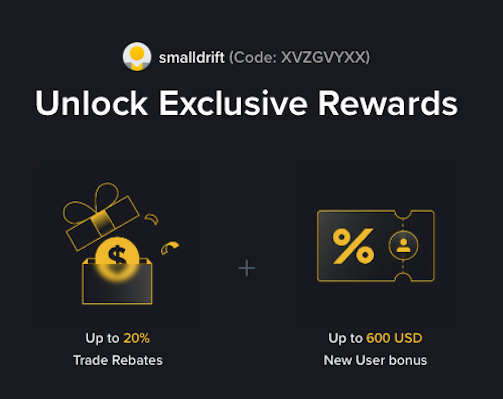
- Referral Code: XVZGVYXX
- Trade Rebate: Up to 20% on every trade (lifetime)
- New User Bonus: Up to 600 USD
If the registration page does not show these benefits, do not proceed. Only sign up when you can confirm the referral code and discount are applied.