How to Create a Binance Account in 2026 (Complete Guide)
Step-by-step guide to signing up for Binance with a referral fee discount. Includes KYC verification, security setup, and first trade tips.
Binance is the world’s largest cryptocurrency exchange by daily trading volume. In this guide, we’ll walk you through creating an account with a lifetime fee discount applied automatically.
Before You Start
You’ll need:
- A valid email address or phone number
- A government-issued ID (passport, driver’s license, or national ID)
- A smartphone for two-factor authentication
Step 1: Use a Referral Link
The most important step is to start with a referral link. This locks in a permanent 20% discount on all trading fees. There’s no catch — you get the exact same account, just cheaper.
If you sign up without a referral link, you cannot add one later. So don’t skip this step.
Step 2: Create Your Account
Enter your email address and choose a strong password. Binance requires at least 8 characters with a mix of uppercase, lowercase, and numbers.
You’ll receive a verification code via email — enter it to confirm.
Step 3: Complete KYC Verification
KYC (Know Your Customer) verification is mandatory for all Binance accounts. Upload a clear photo of your ID and take a selfie. The automated system typically approves you in under 5 minutes.
Without KYC, you won’t be able to deposit, withdraw, or trade.
Step 4: Set Up Security
This is non-negotiable. Enable two-factor authentication (2FA) using Google Authenticator. SMS 2FA is also available but less secure.
Additional security measures to enable:
- Anti-phishing code: A custom word that appears in all legitimate Binance emails
- Withdrawal whitelist: Only allow withdrawals to pre-approved addresses
- Device management: Review and remove unknown devices
Step 5: Make Your First Deposit
You have several options:
- Crypto transfer: Send BTC, ETH, or USDT from another wallet
- P2P trading: Buy crypto directly from other users with local payment methods
- Credit card: Buy crypto with a card (higher fees apply)
Maximizing Your Fee Discount
Once your account is set up, take these extra steps to minimize fees:
- Buy some BNB — Enable “Use BNB for fees” in settings for an extra 25% off
- Use limit orders — Maker fees are often lower than taker fees at higher VIP levels
- Check your fee tier — As your trading volume increases, you’ll automatically unlock lower fee tiers
With the referral discount + BNB payment, your effective trading fee drops to approximately 0.06% — among the lowest in the industry.
Verify Before You Sign Up — Don't Get Scammed
Many sites advertise fake referral discounts that don't actually apply. Before signing up through any referral link, always verify the referral code and discount rate shown on the Binance registration page. Here's proof of our verified referral:
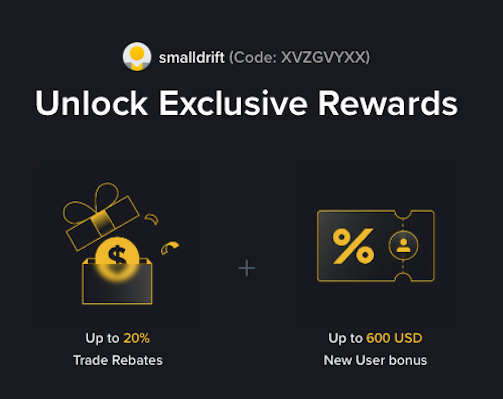
- Referral Code: XVZGVYXX
- Trade Rebate: Up to 20% on every trade (lifetime)
- New User Bonus: Up to 600 USD
If the registration page does not show these benefits, do not proceed. Only sign up when you can confirm the referral code and discount are applied.