Binance Grid Bot Tutorial: Automated Trading Setup Guide
Complete guide to setting up and running a grid trading bot on Binance. Covers how grid bots work, parameter selection, profit expectations, and risk management.

What Is a Grid Bot?
A grid bot automatically places buy and sell orders at preset price intervals — creating a “grid” of orders. When price drops, it buys. When price rises, it sells. It profits from the natural price oscillation that happens in any market.
You don’t need to predict market direction. The bot profits from volatility itself.
How Grid Trading Works
Imagine BTC is at $60,000 and you set a grid from $55,000 to $65,000 with 10 grid levels:
$65,000 — Sell order
$64,000 — Sell order
$63,000 — Sell order
$62,000 — Sell order
$61,000 — Sell order
$60,000 — Current price
$59,000 — Buy order
$58,000 — Buy order
$57,000 — Buy order
$56,000 — Buy order
$55,000 — Buy order
When BTC drops to $59,000, the bot buys. When it bounces to $61,000, the bot sells — locking in $2,000 of profit (on that grid level). This happens automatically across all grid levels, 24/7.
The profit per grid:
Profit per grid = Grid Spacing / Number of Grids × Total InvestmentWith $10,000 investment, 10 grids across a $10,000 range:
- Grid spacing: $1,000
- Investment per grid: ~$1,000
- Profit per grid trade: ~$16.67 (1.67%)
- Minus fees: ~$1.20 (with referral + BNB)
- Net profit per grid: ~$15.47
If the bot completes 5 grid trades per day: $77/day = $2,310/month
But this is the optimistic scenario. In reality, the number of grid trades depends entirely on how much price oscillates within your range.
Setting Up a Grid Bot on Binance
Step 1: Navigate to Grid Trading
- Go to Trade → Strategy Trading → Grid Trading
- Select Spot Grid (safer for beginners) or Futures Grid
- Choose your trading pair (BTC/USDT recommended for beginners)
Step 2: Configure Parameters
Auto Mode: Binance suggests parameters based on recent market data. Good for beginners but not optimal.
Manual Mode: You set everything yourself. Better results but requires understanding.
Key Parameters:
Price Range (Upper and Lower)
- The bot only works within this range
- If price leaves the range, the bot stops trading
- Too narrow = more trades but higher risk of leaving range
- Too wide = fewer trades per grid
- Tip: Set range based on recent support/resistance levels. Look at 1-month price history for reference.
Number of Grids
- More grids = more trades, smaller profit per trade
- Fewer grids = fewer trades, larger profit per trade
- Each grid needs enough profit to cover fees
- Minimum spacing: At least 0.3% between grids to cover fees profitably
- Recommended: 20-50 grids for spot, 10-30 for futures
Total Investment
- How much capital to allocate to the bot
- More capital = larger positions per grid = more profit per trade
- Start with $200-500 while learning
Step 3: Review and Launch
- Review the projected profit range
- Check the grid spacing vs fee rate
- Click Create to launch the bot
- The bot starts placing orders immediately
Spot Grid vs Futures Grid
Spot Grid (Recommended for beginners)
- Buys and sells the actual cryptocurrency
- No liquidation risk
- If price drops below range, you hold the crypto (unrealized loss, not a permanent loss)
- Lower risk, moderate returns
Futures Grid
- Trades futures contracts with leverage
- Liquidation risk if price moves far outside range
- Higher potential returns but significantly higher risk
- Requires careful leverage management
Recommendation:
Start with Spot Grid on BTC/USDT. Move to futures grid only after you understand the mechanics and have seen consistent results.
Optimal Settings for Different Market Conditions
Sideways/Ranging Market (Best for grid bots)
- Price oscillates between support and resistance
- Set range: Recent low to recent high
- Grids: 30-50
- Expected return: 1-5% monthly
Trending Up Market
- Use an arithmetic grid (equal spacing) with upper bound above current price
- Consider a long-biased futures grid
- Be ready to adjust if price breaks above range
Trending Down Market
- Grid bots in spot will accumulate the asset (buying dips)
- You’ll hold more crypto at lower prices — good if you’re long-term bullish
- Your unrealized PnL may be negative, but grid profits continue
High Volatility
- Wider range, more grids
- Each oscillation generates more profit
- This is where grid bots shine
Fee Impact on Grid Profitability
Fees are critical for grid bots because they trade frequently. Each grid trade has a buy and sell — so you pay fees twice.
Without fee optimization:
- Spot fee: 0.10% per trade
- Round trip: 0.20%
- Minimum profitable grid spacing: ~0.30% (0.20% fees + 0.10% profit)
With referral code XVZGVYXX + BNB:
- Spot fee: ~0.06% per trade
- Round trip: ~0.12%
- Minimum profitable grid spacing: ~0.18%
The referral discount allows you to use tighter grids (more grids in the same range), which means more trades and more profit. For grid bots specifically, the fee discount has an outsized impact.
Example: 40 grids in a $58,000-$62,000 range
| Fee Rate | Profit per Grid | Daily Trades (est.) | Monthly Profit |
|---|---|---|---|
| 0.10% (no discount) | $0.50 | 8 | $120 |
| 0.06% (referral + BNB) | $3.50 | 12 | $1,260 |
The lower fee rate makes more grids profitable and increases trade frequency.
Risk Management for Grid Bots
1. Don’t invest more than you can lose
Grid bots in spot can result in holding crypto at a loss if price drops below range. Only invest what you’re comfortable holding long-term.
2. Avoid grid bots during extreme trends
If BTC is clearly trending down (breaking support after support), a spot grid bot will keep buying into the decline. Pause during obvious downtrends.
3. Monitor weekly, not hourly
Grid bots are set-and-forget by design. Check weekly for:
- Is price still within the grid range?
- What’s the accumulated profit?
- Have market conditions changed significantly?
4. Set a total stop-loss
For futures grids, set an overall stop-loss (e.g., close everything if total loss exceeds 10% of allocated capital).
5. Diversify grid strategies
Run multiple bots on different pairs:
- BTC/USDT grid (most stable)
- ETH/USDT grid (higher volatility = more trades)
- A stablecoin pair (USDC/USDT) for ultra-low-risk, low-return arbitrage
Realistic Expectations
Based on typical market conditions and proper setup:
| Market Condition | Monthly Return (Spot Grid) |
|---|---|
| Low volatility sideways | 0.5-2% |
| Normal volatility sideways | 2-5% |
| High volatility sideways | 5-10% |
| Trending (up or down) | 0-1% (+ unrealized gains/losses) |
Grid bots are not get-rich-quick tools. They’re steady income generators that work best in ranging markets. The key is consistency over months, not spectacular single-month returns.
Getting Started Checklist
- Sign up with referral code XVZGVYXX (20% off — critical for grid bot profitability)
- Enable BNB fee payment (additional 25% off)
- Go to Strategy Trading → Grid Trading
- Start with Spot Grid on BTC/USDT
- Use $200-500 initial capital
- Set range based on 1-month price history
- Use 20-40 grids (auto mode is OK for first try)
- Let it run for 2 weeks before evaluating
- Adjust parameters based on results
The combination of a grid bot and optimized fees creates a semi-passive income stream that works whether the market goes up, down, or sideways.
Verify Before You Sign Up — Don't Get Scammed
Many sites advertise fake referral discounts that don't actually apply. Before signing up through any referral link, always verify the referral code and discount rate shown on the Binance registration page. Here's proof of our verified referral:
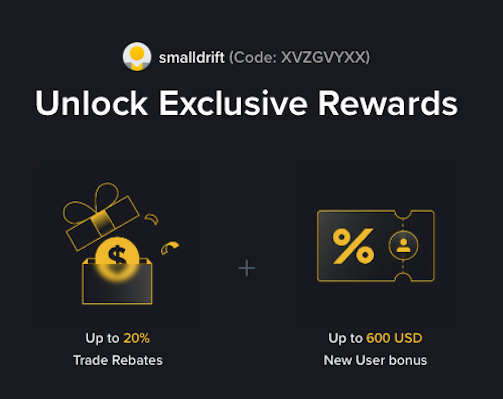
- Referral Code: XVZGVYXX
- Trade Rebate: Up to 20% on every trade (lifetime)
- New User Bonus: Up to 600 USD
If the registration page does not show these benefits, do not proceed. Only sign up when you can confirm the referral code and discount are applied.