Binance API Trading Guide: Connect Bots and Automate Your Strategy
Complete guide to Binance API trading. Learn how to create API keys, connect trading bots, set up automated strategies, and manage security.

Why Use the Binance API?
The Binance API lets you connect external trading bots, build custom tools, and automate strategies that would be impossible to execute manually. Whether you want to run a 24/7 grid bot, execute complex multi-leg orders, or build your own trading system, the API is the foundation.
Creating API Keys
Step 1: Generate Keys
- Log into Binance
- Go to Account → API Management
- Create a new API key and label it descriptively (e.g., “Grid Bot”, “3Commas”)
- Complete 2FA verification
- You’ll receive two keys:
- API Key: Your public identifier
- Secret Key: Your private key (shown only once — save it immediately)
Step 2: Set Permissions
Configure what the API key can do:
| Permission | Description | Risk |
|---|---|---|
| Read | View balances, orders, history | Low |
| Spot Trading | Place/cancel spot orders | Medium |
| Futures Trading | Place/cancel futures orders | High |
| Withdrawals | Withdraw funds | Very High (avoid!) |
Recommended: Enable only Read + the trading type you need. Never enable Withdrawals unless absolutely necessary.
Step 3: IP Whitelist
Restrict the API key to specific IP addresses:
- Get the IP address of your bot server
- Add it to the IP whitelist for this key
- The key will only work from whitelisted IPs
This is critical for security. Even if someone steals your API key, they can’t use it from a different IP.
Connecting Popular Trading Bots
3Commas
- Create a Binance API key with Spot + Futures permissions
- In 3Commas: My Exchanges → Add Exchange → Binance
- Paste your API Key and Secret Key
- Enable IP whitelist with 3Commas server IPs
- Test the connection
Cornix (Telegram-based)
- Create API key with appropriate trading permissions
- In Cornix bot: Link Binance exchange
- Enter API credentials
- Configure trading parameters
Custom Bot (Python)
from binance.client import Client

api_key = 'your_api_key'
api_secret = 'your_api_secret'
client = Client(api_key, api_secret)

# Get account balance
balance = client.get_account()

# Place a spot limit order
order = client.create_order(
    symbol='BTCUSDT',
    side='BUY',
    type='LIMIT',
    timeInForce='GTC',
    quantity=0.001,
    price='55000'
)

# Place a futures order
from binance.client import Client
futures_order = client.futures_create_order(
    symbol='BTCUSDT',
    side='BUY',
    type='LIMIT',
    timeInForce='GTC',
    quantity=0.01,
    price='55000'
)
Install the library: pip install python-binance
API Rate Limits
Binance has request limits to prevent abuse:
| Type | Limit |
|---|---|
| Order placement | 10 orders/second, 100,000/day |
| Weight limit | 1,200/minute (each endpoint has a weight) |
| WebSocket streams | 5 messages/second |
Tips to stay within limits:
- Use WebSocket for real-time data instead of polling REST API
- Batch operations when possible
- Cache data that doesn’t change frequently (exchange info, fee rates)
- Handle 429 (Too Many Requests) errors gracefully — implement exponential backoff
VIP users get higher rate limits, which is another reason to consolidate trading volume on Binance and work toward higher tiers.
Common API Trading Strategies
Dollar-Cost Averaging (DCA) Bot
Automatically buy a fixed dollar amount of BTC/ETH at regular intervals:
- Buy $100 BTC every day at 12:00 UTC
- Removes emotion from buying decisions
- Works well in volatile markets
Rebalancing Bot
Maintain target portfolio allocations:
- Target: 50% BTC, 30% ETH, 20% USDT
- Bot checks daily and rebalances if any asset drifts >5% from target
Arbitrage Bot
Exploit price differences between trading pairs:
- BTC/USDT vs BTC/BUSD
- Triangular arbitrage across three pairs
- Requires very fast execution and low fees
Signal-Based Trading
Connect to signal providers (Telegram channels, TradingView alerts):
- Signal received → API places the order automatically
- Can execute faster than manual trading
- Combine with risk management rules (max position size, stop-loss)
API Security Best Practices
1. Never hardcode API keys
Store keys in environment variables or a secure config file:
import os
api_key = os.environ.get('BINANCE_API_KEY')
api_secret = os.environ.get('BINANCE_API_SECRET')
2. Always use IP whitelisting
This is the single most important security measure for API keys.
3. Create separate keys for different bots
If one bot is compromised, only that key needs to be revoked.
4. Disable withdrawal permissions
Trading bots don’t need withdrawal access. Never grant it.
5. Rotate keys periodically
Delete and recreate API keys every 3-6 months as a precaution.
6. Monitor API activity
Regularly check your trade history and API log for any unauthorized activity.
7. Use testnet first
Binance has a testnet (testnet.binancefuture.com) for testing strategies with fake money before going live.
Fee Optimization for Bot Trading
Bots trade frequently, making fee optimization crucial:
The impact:
A bot making 50 trades/day with $1,000 per trade:
- Without discount: 50 × $1,000 × 0.10% × 2 = $100/day = $36,500/year
- With referral + BNB: 50 × $1,000 × 0.06% × 2 = $60/day = $21,900/year
- Savings: $14,600/year
For futures bots with leverage:
- Without discount: 50 × $10,000 × 0.05% × 2 = $500/day
- With referral + limit orders: 50 × $10,000 × 0.016% × 2 = $160/day
- Savings: $340/day = $124,100/year
The referral discount is essential for bot profitability. Many strategies that are unprofitable at standard fees become profitable with the discount.
Sign up with referral code XVZGVYXX before creating your API keys to ensure all bot trades benefit from the 20% fee reduction.
Troubleshooting Common Issues
”Signature for this request is not valid”
- Check that your API secret is correct
- Ensure your system clock is synchronized (NTP)
- Check for extra whitespace in your keys
”IP address not allowed”
- Your bot’s IP isn’t in the whitelist
- Cloud servers may have changing IPs — use an elastic IP
”Insufficient balance”
- Check that funds are in the correct wallet (spot vs futures)
- Account for the margin required for the order
”Order would immediately trigger”
- Your limit price crosses the current market price
- Adjust the price or use a market order
Getting Started Checklist
- Sign up with referral code XVZGVYXX (20% off all API trades)
- Enable BNB fee payment (additional 25% off spot)
- Create API key with minimal required permissions
- Set IP whitelist
- Test on Binance testnet first
- Start with a simple strategy (DCA is the safest starting point)
- Monitor closely for the first week
- Scale up gradually after confirming profitability
Verify Before You Sign Up — Don't Get Scammed
Many sites advertise fake referral discounts that don't actually apply. Before signing up through any referral link, always verify the referral code and discount rate shown on the Binance registration page. Here's proof of our verified referral:
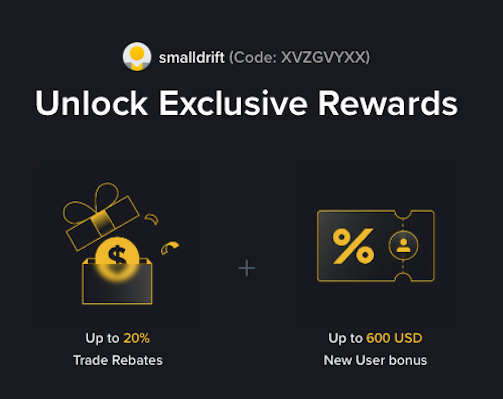
- Referral Code: XVZGVYXX
- Trade Rebate: Up to 20% on every trade (lifetime)
- New User Bonus: Up to 600 USD
If the registration page does not show these benefits, do not proceed. Only sign up when you can confirm the referral code and discount are applied.